Built for video production teams
Enquiries, quotes and jobs.
All in one place.
A CRM for small video production teams. Follow up enquiries, quote every film and version, and keep extra work from slipping into the job unpaid.
Coming soon · 21-day trial at launch · No payment details todayA four-step product tour
From the first enquiry to the final delivery.
Explore the workflow with actual product screens and fictional sample records.
Know who needs a reply.
Keep the client, brief, owner and next action with every enquiry.
A client asks for a film. Save the brief, choose who owns the enquiry and set the next action, so the follow-up has a place to live.
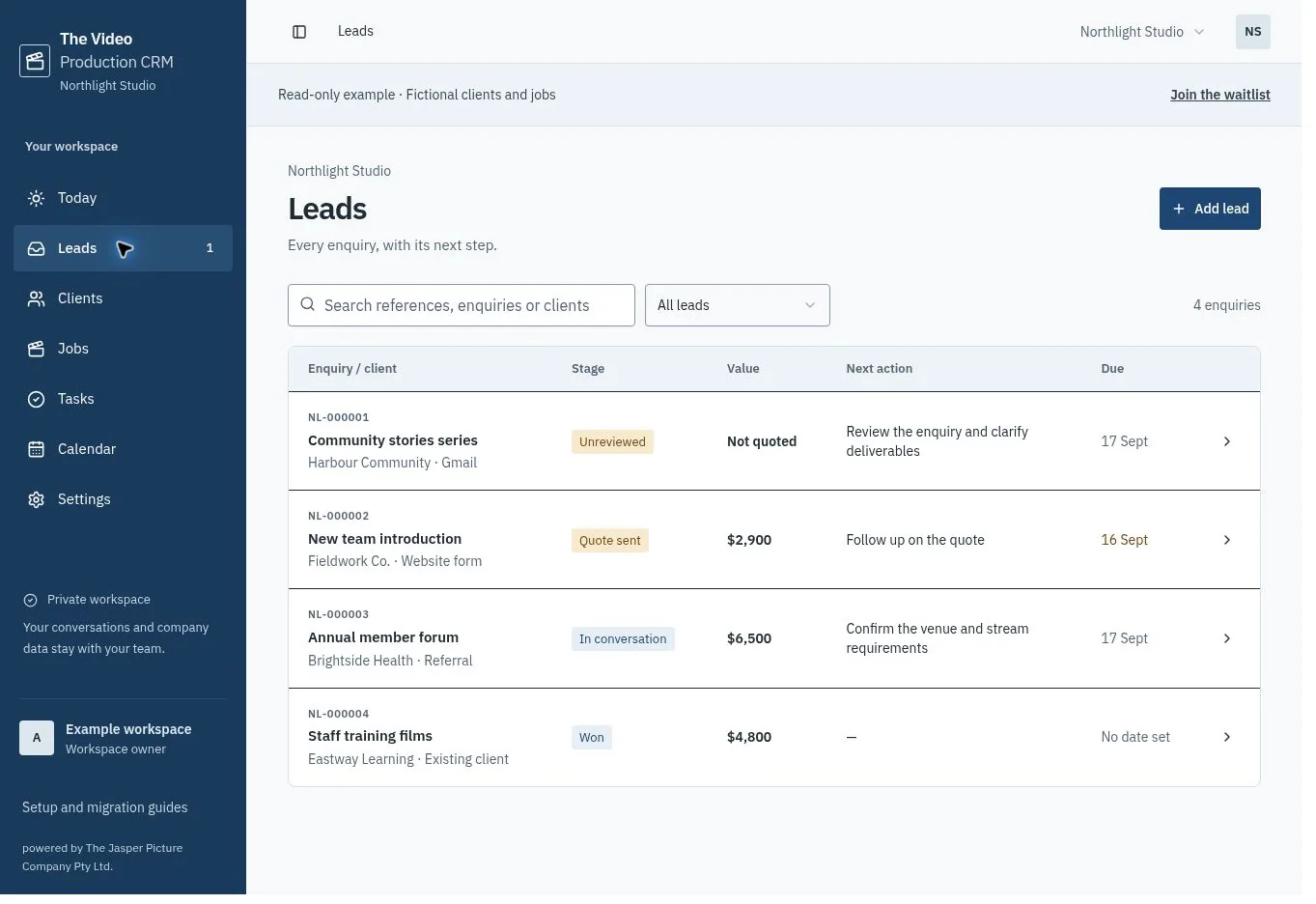
Actual product screens. Fictional clients and projects.Swipe the screen to see more.
Built around production
Keep the agreed work connected.
From the first quote to the last delivery version, your team can see what was promised and what needs to happen next.
Define every film and version
Record masters, vertical cuts, captions and formats. Keep shoot requirements and revision rounds with the quote.
Explore deliverablesBuild a clearer quote
Combine filming days, editing hours, equipment and travel at your own rates. Scope checks highlight missing details.
See how quoting worksTurn accepted work into tasks
Record acceptance to create a job and a task for each delivery version. The production reference and initial due date carry through.
Follow the handoverPut a price on extra work
Compare a new request with the agreement, price the change and record the client’s decision. Approved extras create delivery tasks.
Explore variationsBuilt from production experience
Built by a production company. For production companies.
Matt Jasper
Founder, The Jasper Picture Company
I’m Matt, a cameraman and the founder of The Jasper Picture Company in Melbourne. Since 2014, our team has produced video and live streams for organisations across Australia.
Production admin is part of that work: following up an enquiry, agreeing what is included, handing a job to the team and keeping track of changes.
The Video Production CRM draws on that experience. It keeps the films, versions, revision rounds and next actions with the job, so the agreement stays clear from the first enquiry to delivery.
Meet the production company behind itA practical start
Three steps to your first job.
- 01
Set up your company
Add your company details, time zone, rates and quote terms. Invite your team when customer access opens.
Set your defaults - 02
Add an active enquiry
Bring in a client, the brief and the next action. Start small, or import a sample of contacts with our CSV template.
Bring in your work - 03
Quote it. Then get to work.
Define the films and versions, check the scope and share the quote. Record acceptance to create the job and delivery tasks.
Follow the first job
Simple team pricing
One plan for your studio.
Start with three people, including the owner. Add staff seats as your team grows. Your client contacts never count as seats.
- Contacts, enquiries, quotes and jobs
- Films, delivery versions and scope checks
- Tasks, priced variations and shared calendar
- Company rates, branding, terms and export
21-day trial at launch. Payments are not open yet.
AUD 99 / month
Per company. Includes GST for Australian customers.
AUD 99 per company / month
Three seats included. Each additional staff seat is AUD 19 / month. Client contacts do not count as seats.
Includes GST for Australian customers. Local prices are fixed when you subscribe. Billing opens at launch.
At launch, a payment method is required for the trial. Cancel before it ends to avoid the subscription charge.
In preparation
More help with the follow-up.
We’re preparing these connected services for customer access. They are not available yet.
Gmail enquiries
Bring in messages from one chosen mailbox label and review replies before sending.
AI assistance
Draft briefs and follow-ups from authorised company context. 150 requests per month when activated.
SMS lead alerts
Internal alerts with business hours and a monthly cap. Pricing will be confirmed before activation.
The details
Good questions.
Clear answers.
How does the free trial work?
The launch offer is 21 days free, then AUD 99 per company / month for three seats. Includes GST for Australian customers. Extra seats increase the monthly total shown before checkout. A payment method is required; cancel before the trial ends to avoid the subscription charge. Billing opens at launch.
Will it fit our pricing model?
Use your own rates, currency, tax and terms. Combine filming days, editing hours, fixed packages, equipment and travel on the same quote. Your team sets the scope and approves the price.
How do leads get in?
Add enquiries manually. A CSV can bring in your contacts; it does not import leads or jobs. Once Gmail is activated, connect one mailbox and choose an enquiry label. Matching emails arrive as unreviewed leads for your team to check.
How difficult is the move?
Start with a small contacts import, check the results, then bring over active enquiries and their next actions. Our migration guide includes a CSV template and a cutover checklist. Historic jobs, attachments and automation rules need separate planning.
Do we need our own AI account?
No. The Studio plan includes 150 AI requests each month once the service is activated. Briefs, replies and follow-ups use the selected company’s authorised records. Your team reviews the draft and approves any send.
Who can see our company’s information?
Access is checked against workspace membership. Contacts, prices, conversations and AI context are scoped to that company. AI providers process only the selected context needed for the request; the privacy guide explains the boundary.
Can we record extra work after acceptance?
Yes. Open the job and propose a priced variation. Share it through your current client communication process, then record approval or decline with evidence. Approval creates tasks for the additional delivery versions. This is a team-recorded decision, not a client signature portal.
Can we add more people?
Yes. The Studio plan includes three people, including the owner. Each additional staff seat is AUD 19 / month. Includes GST for Australian customers. At launch, the owner can buy seats and review part-month charges in Settings. Client contacts do not count as seats.
Does it store our videos?
No. Keep footage, edits, review and file delivery in your existing tools. The CRM records the agreed outputs, their formats, tasks and dates.
What can we explore today?
Read the feature pages, see the product screenshots and use the free guides and templates. Join the waitlist to hear when you can start your 21-day trial. Gmail, AI, SMS and billing are still awaiting activation.